TEXT2SQL - My version
SQL is powerful, but it’s a barrier. Every time you want a quick answer from your database, you have to context-switch into query-writing mode — remembering table names, join conditions, column types. What if you could just ask?
That’s why I built D1 Explorer — a terminal UI that lets you query Cloudflare D1 databases using natural language. You type “show me customers who signed up in 2024” and it generates the SQL, executes it, and shows you the results. No trying to remember the table names and complex queries from long lost sessions. No switching between tabs. Just answers. My first version had my schema hard-coded in the TUI. This version is generic.
What It Looks Like in Practice
> show me all customers
┌────┬──────────────┬────────────┬──────────┐
│ id │ name         │ email      │ verified │
├────┼──────────────┼────────────┼──────────┤
│  1 │ Acme Corp    │ acme@...   │ true     │
│  2 │ Globex Inc   │ globex@... │ false    │
└────┴──────────────┴────────────┴──────────┘

> filter those by verified = true

> now show their practice locations
Each query builds on the last. The AI remembers context, so follow-up questions work naturally — just like a conversation.
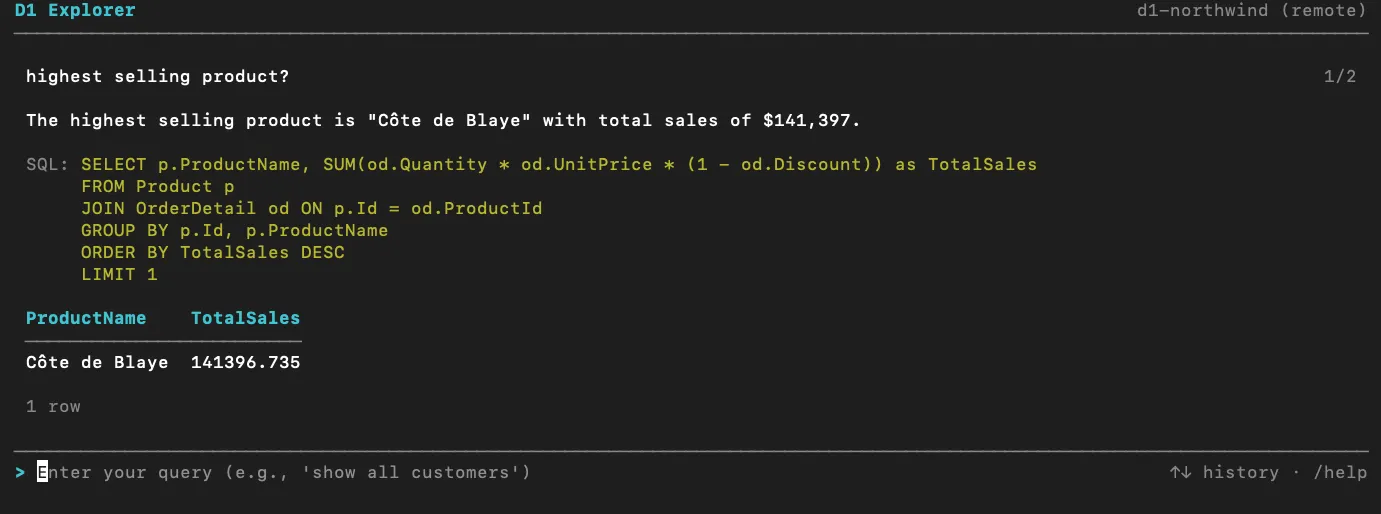
D1-explorer running against the Northwind DB
Zero Configuration
One of the design principles I cared most about: no setup files, no config, no schema definitions.
On first run, D1 Explorer launches a setup wizard that:
- Detects your Cloudflare account from `wrangler whoami`
- Lists your D1 databases and lets you pick one
- Reads the schema directly from D1 — tables, columns, foreign keys, all of it
- Uses AI to generate human-readable notes about your schema’s quirks and relationships
Everything is persisted locally. Next time you run it, you’re right where you left off, defaulting to your most recently used database.
The Technical Decisions That Mattered
A self-correcting agent loop
The AI doesn’t always get the SQL right on the first try. Instead of showing an error and giving up, D1 Explorer implements a 3-attempt loop:
- Generate SQL from the question + schema
- Execute against D1
- Evaluate — does this actually answer the question?
- If not, feed the error back and try again
In practice, this handles the majority of “almost right” queries — wrong column name, missing JOIN, off-by-one in a GROUP BY. The user never sees the failed attempts.
Read-only by default
Mutations (INSERT, UPDATE, DELETE, DROP) are blocked unless you explicitly pass —allow-mutations. Every query is validated before execution. This was non-negotiable — a tool that translates natural language to SQL could easily produce destructive queries from ambiguous input. Disclaimer: I haven’t tested the —allow-mutations flag at all.
Wrangler as the database layer
Rather than building a custom D1 driver or maintaining persistent connections, D1 Explorer shells out to wrangler d1 execute —json for every query. It’s stateless, simple, and leverages authentication that developers already have configured locally. Nothing fancy, use what’s there.
The Stack
- TypeScript + Node.js for the runtime
- React + Ink for the terminal UI (yes, React in the terminal — it works remarkably well)
- Claude API for SQL generation, evaluation, and summarization
- Cloudflare D1 via Wrangler CLI
- Zod for configuration validation
Takeaways
AI-powered tools need guardrails, not just capabilities. The mutation blocking, retry limits, and evaluation step aren’t features — they’re what makes the tool trustworthy enough to use on real data.
Streaming isn’t optional for AI UX. The perceived performance difference between “wait 4 seconds then show everything” and “start showing text immediately” is enormous, even when the total time is the same.
Dynamic discovery beats configuration. Every minute spent on schema auto-detection saved hours of “why isn’t this working” debugging. The best config file is no config file.
Conversation context changes how you explore data. Being able to say “filter those by verified” or “same but for 2024” turns a query tool into a data exploration tool. It’s the difference between running isolated commands and having a dialogue with your data.
Try It Out
Grab the code from https://github.com/jipatel/d1-explorer. If you work with Cloudflare D1 and want a faster way to explore your data, give it a spin:
npm install
npm run build
npm start
The setup wizard handles the rest.
Building developer tools that remove friction from real workflows — that’s what gets me excited. What’s a tool you wish existed for your day-to-day work?
#DeveloperTools #AI #CloudflareDevelopers #TypeScript #OpenSource #TerminalUI #SQL #NaturalLanguageProcessing